

Key takeaways
- Work order software helps maintenance teams create, assign, complete, track, and report on work orders from one centralized system.
- The best platforms combine mobile work order execution with preventive maintenance, asset history, inventory visibility, communication tools, reporting, and workflow customization.
- MaintainX stands out as the best work order management software for teams that need fast adoption, mobile-first execution, built-in communication, and scalable workflows across sites.
- Work order software improves maintenance operations by increasing efficiency, standardizing work, improving communication, reducing missed tasks, and lowering costs over time.
- The right system depends on your team’s workflows, but mobile usability, adoption, integrations, asset and inventory management, and reporting should be core evaluation criteria.


If you search Google for work order software, it’s easy to get overwhelmed by the options. If you ask ChatGPT or another LLM, it will deliver a shorter list, but still one you have to sort through, trying to understand the pros and cons of each and which one fits your operation. You know the pay-off will be worth it, but it’s still a long process that pulls you away from other important jobs at your facility.
That’s why we created this guide—to guide you on your evaluation of work order management software and hopefully cut the amount of time it takes for you to make that decision. Finding a computerized maintenance management system (CMMS) is not just an investment of your budget, but also your team’s time. This article will help you make sure all that money and resources you spend delivers value.
Read on to find out the best work order management platforms, the key features for each, and if they are a good fit for your maintenance team.
What is work order software?
Work order software is a digital platform for managing everything to do with maintenance work orders, including creating, scheduling, assigning, completing, and tracking work orders. Work order management software typically facilitates the execution of standard operating procedures (SOPs), production workflows, quality control, and safety inspections.
Maintenance managers can maintain full visibility of the work performed across their organizations at all times while creating, assigning, and tracking work orders from both mobile apps and desktops. Work order software is often a part of a computerized maintenance management system, which is a platform that manages all maintenance activities, including asset management, inventory management, KPI tracking, and more.
The best work order management Software
We used customer reviews, user experience, and functionality to create this work order software app assessment. We looked at five of the top work order software solutions that include simple work order software and CMMS software.
1. MaintainX
Key features
- Mobile work order execution: MaintainX is built for frontline teams that need to create, assign, update, and close work orders from the floor. Technicians can access job details, asset history, photos, comments, QR and barcode scanning, and offline functionality from a phone or tablet.
- Fast adoption: Reviewers often point to MaintainX’s simple, mobile-first experience as a major advantage. The platform is easy for non-technical users to learn, which helps teams move away from paper work orders, spreadsheets, and legacy systems faster.
- Preventive maintenance automation: MaintainX helps teams move from reactive repairs to planned maintenance with recurring PMs, meter-based work orders, condition-based triggers, and dashboards that make it easier to track PM compliance and work order completion.
- Connected asset and work history: Each work order can be tied to assets, procedures, inspections, photos, comments, and completion records. This gives maintenance teams a searchable digital history of what was done, who did it, when it happened, and what information was captured.
- Inventory management: MaintainX supports parts and inventory workflows alongside work orders, helping teams track stock levels, reduce shortages, and connect maintenance activity with ERP systems.
- Standardization across locations: Multi-site teams can use MaintainX to standardize work order processes, checklists, inspections, and communication across facilities.
What to watch out for
- Highly regulated environments may require additional evaluation: MaintainX supports audit-ready work histories, digital checklists, required fields, signatures, and traceability, but organizations with especially strict validation or compliance requirements should confirm whether the platform fits their specific regulatory needs out of the box.
- Complex workflows may need configuration support: MaintainX is designed for ease of use, but advanced use cases may require help from the support or implementation team to configure effectively.
Industries using MaintainX:
- Manufacturing (building materials, chemicals, plastics, automotive, food and beverage, and more)
- Facilities management (Distribution centers, retail, and warehouses)
- Farming and agriculture
- Mining
- Upstream oil and gas
- Hospitality
- Fleet management and heavy equipment
- Property management and building maintenance
Best suited for:
- Asset-intensive operations: Organizations where equipment uptime directly drives business performance and maintenance is a competitive advantage, not just overhead.
- Multi-site or scaling organizations: Teams that have outgrown clipboards and spreadsheets but don't want the burden of overcomplicated legacy systems, and companies that need real adoption from frontline technicians, not just a tool that looks good in a demo.
- Organizations undergoing operational transformation: Companies modernizing maintenance workflows, digitizing tribal knowledge, or consolidating disconnected tool stacks into a single system of record that their entire team, from the plant floor to the executive suite, can trust.


2. UpKeep
Key features
- Simple work order management: Often praised for making it easy to create, assign, update, and track work orders, helping teams move from paper or spreadsheets to a digital system quickly.
- Mobile access for frontline teams: Technicians can use the mobile app to view tasks, submit work requests, upload photos, update asset records, and communicate from the floor.
- Preventive maintenance scheduling: Teams use the software to build recurring PMs, reminders, and meter-based maintenance programs that help standardize routine work.
What to watch out for
- Reporting can take extra effort: Reviewers say basic reporting is useful, but custom or advanced reports can be less intuitive to build and may require more setup than expected.
- Mobile and workflow limitations: Some users report that the mobile experience can feel slower or less polished than desktop, especially when managing recurring PMs, quick filters, or workflow changes.
- Complex setups may need support: Teams with detailed asset hierarchies, custom fields, purchase order workflows, or multi-technician assignment needs may run into configuration limits or require additional support.
3. Limble
Key features
- Straightforward maintenance management: Reviewers like the platform for bringing work orders, preventive maintenance schedules, asset histories, and parts tracking into one relatively easy-to-use system.
- Helpful PM planning tools: Reviewers like the ability to build PM templates, schedule recurring work, use calendar views, and connect work requests to assets through QR codes.
- Strong onboarding and support: Customers frequently mention responsive support, training, and implementation guidance that help teams get set up and tailor the system to their workflows.
What to watch out for
- Reporting and dashboards can take work: Users say dashboards, KPIs, and custom reports often require extra setup, and some teams want more flexible exports or simpler standard reporting options.
- PM setup may have a learning curve: While Limble supports preventive maintenance planning, some reviewers say configuring frequencies, templates, and future PM visibility can be confusing or time-consuming.
- Mobile and search limitations: Some users report mobile app hiccups, differences between desktop and mobile functionality, or search behavior that makes records harder to find unless naming is exact.
4. Fiix
Key features
- Solid work order and PM management: It’s often praised for helping teams create, assign, schedule, and close work orders, with preventive maintenance tools like calendars, reminders, nested PMs, and event-based triggers.
- Inventory and asset tracking: Reviewers like that it connects parts, assets, barcodes, QR codes, and work orders, making it easier to track spare parts usage and maintenance history.
- Flexible for larger teams: Customers highlight the software’s integrations, role-based permissions, dashboards, and multi-site structure as useful for teams that need more advanced maintenance management.
What to watch out for
- Reporting can be hard to customize: Users say standard dashboards are useful, but building tailored reports, KPIs, or deeper analytics may require extra setup, services, or higher-tier functionality.
- Mobile experience may lag desktop: Some reviewers report that the mobile app lacks certain desktop features or has reliability issues with tasks like barcode scanning and work order completion.
- Implementation requires planning: Fiix can support complex maintenance programs, but teams may need clean asset data, clear workflow standards, and admin training to avoid slow rollout or inconsistent records.
5. eMaint
Key features
- Highly configurable workflows: Reviewers mention its flexible forms, fields, dashboards, permissions, and workflows, which help larger teams adapt the system to existing maintenance processes.
- PM and work order depth: Reviewers like its ability to manage preventive maintenance, auto-generated work orders, meter-based schedules, nested PMs, and asset-linked work history.
- Useful reporting once configured: Teams value the software's reporting, dashboards, asset hierarchy, and data tools for tracking KPIs, compliance, costs, and multi-site maintenance performance.
What to watch out for
- Reporting can require technical help: Users say custom reports and dashboards can be difficult to build without training, support, or SQL/BI experience.
- Mobile experience may slow technicians down: Some reviewers mention limited mobile search, too much scrolling, and usability issues that can push technicians back toward printed work orders.
- Navigation and setup have a learning curve: eMaint’s flexibility can make implementation, form customization, scheduling, and day-to-day navigation feel more complex for new users.
.jpeg)
Six benefits of work order management software
Work order software helps maintenance teams streamline processes, improve efficiency, and increase productivity. Here are the top six benefits of using work order software:
1. Enhanced operational efficiency
Work order software helps maintenance teams get more done with less manual follow-up. Instead of chasing requests, updating spreadsheets, or coordinating work by phone, teams can create, assign, prioritize, and track work orders in one place.
2. Improved communication and collaboration
A digital work order system gives everyone the same source of truth. Technicians, managers, operators, and requesters can see job status, notes, photos, and updates in one shared system, which reduces confusion and keeps work moving.
3. Increased work order standardization
Digital work orders make it easier to capture the right information every time. Teams can use required fields, checklists, procedures, and templates to standardize how work gets requested, completed, and documented.
4. Improved inventory management
Work order software can connect maintenance tasks with the parts needed to complete them. Teams can see what’s in stock, monitor quantities, link parts to assets, and reduce delays caused by missing materials or last-minute purchasing.
5. Real-time data-driven insights and reporting
Work order software gives teams better visibility into what’s happening across maintenance operations. Managers can track open work, completion times, recurring issues, asset history, downtime, and team performance to spot bottlenecks and make better decisions.
6. Significant cost savings
By reducing manual work, improving scheduling, preventing repeat failures, and helping teams use parts and labor more effectively, work order software can lower maintenance costs over time. It also helps teams catch small issues before they turn into expensive downtime.
Types of work order management software systems
To determine which type of work order management software system is best for your organization, it’s helpful to understand their differences. Below are the three main types of work order management systems and the best use cases for each one.
1. Work order ticketing systems
Basic work order ticketing systems help teams take the first step away from paper, spreadsheets, or informal maintenance requests. At their core, they let users submit a request, assign it to someone, track its status, and keep a basic record of completed work.
That can be enough for very small teams that simply want a more organized way to manage incoming tasks. But these systems are usually limited. They often lack deeper maintenance functionality like preventive maintenance scheduling, asset history, parts inventory, labor tracking, reporting, analytics, and integrations with other systems.
As a result, basic ticketing tools may digitize individual work requests, but they don’t always solve the bigger disconnect between maintenance planning, execution, parts, assets, and performance data. For teams that need more visibility and control, a more complete work order software or CMMS platform is usually a better fit.
2. Computerized maintenance management system (CMMS)
A computerized maintenance management system, or CMMS, helps teams manage the full maintenance lifecycle, not just individual work orders. A CMMS is commonly used by manufacturers, industrial plants, facilities teams, mining operations, hospitality groups, food service companies, and other organizations that depend on physical assets.
Modern CMMS software typically includes tools for preventive maintenance, reactive repairs, asset history, parts inventory, labor tracking, reporting, and real-time operational insights. Instead of managing work, assets, parts, and performance data in separate systems, teams can bring them together in one platform.
Cloud-based CMMS platforms are also more accessible than older, on-premise systems. Many offer subscription pricing, mobile apps for iOS and Android, and scalable features that support both smaller teams and larger multi-site operations.


3. Field service management (FSM)
Field service management software is built for teams that perform work off-site, such as service technicians, installers, inspectors, or mobile repair crews. These systems help dispatch workers, plan routes, share job details, track status updates, and often turn completed work into invoices.
FSM software can be a strong fit for service businesses that need to coordinate people in the field and manage customer-facing jobs. But it is usually less focused on internal maintenance operations. Teams that need deeper asset history, preventive maintenance, parts inventory, inspections, compliance records, and reliability reporting may be better served by a CMMS or work order management platform.
Features to look for in work order software
1. Mobile user experience tailored to frontline teams
Maintenance software only works if your team actually uses it. If technicians find the system confusing, slow, or hard to use in the field, adoption drops, and so does the value of the tool. That means fewer real-time updates, incomplete work histories, slower response times, and less reliable maintenance data.
A good work order system should feel simple from the start, especially for the people completing the work. Look for software with a strong mobile experience, clear task instructions, easy status updates, and practical field tools like photo uploads, annotations, comments, QR codes, and offline access.
This is especially important if you’re replacing a legacy system or ERP module. Many older tools were built for desktop users, not mobile maintenance teams working on the floor, in the field, or across multiple sites.
2. Modern communication features
Maintenance work rarely happens in isolation. Technicians often need input from supervisors, operators, engineers, or other team members before they can complete a job.
That’s why communication should be built into the work order process, not scattered across texts, calls, emails, or hallway conversations. Look for software that lets teams comment on work orders, tag coworkers, share photos, ask questions, and keep updates tied to the task or asset.
When communication happens inside the work order system, important context does not get lost. Teams can see what was discussed, what decision was made, and what happened next, all in the same place as the work history.
3. Built-in asset and inventory management
Work orders are more useful when they are connected to the assets and parts involved. Technicians can see asset history, related procedures, required parts, and past repairs before they start the job.
That added context helps teams work faster and make better decisions in the field. It also gives managers a clearer view of where time, labor, and materials are going across equipment, locations, and teams.
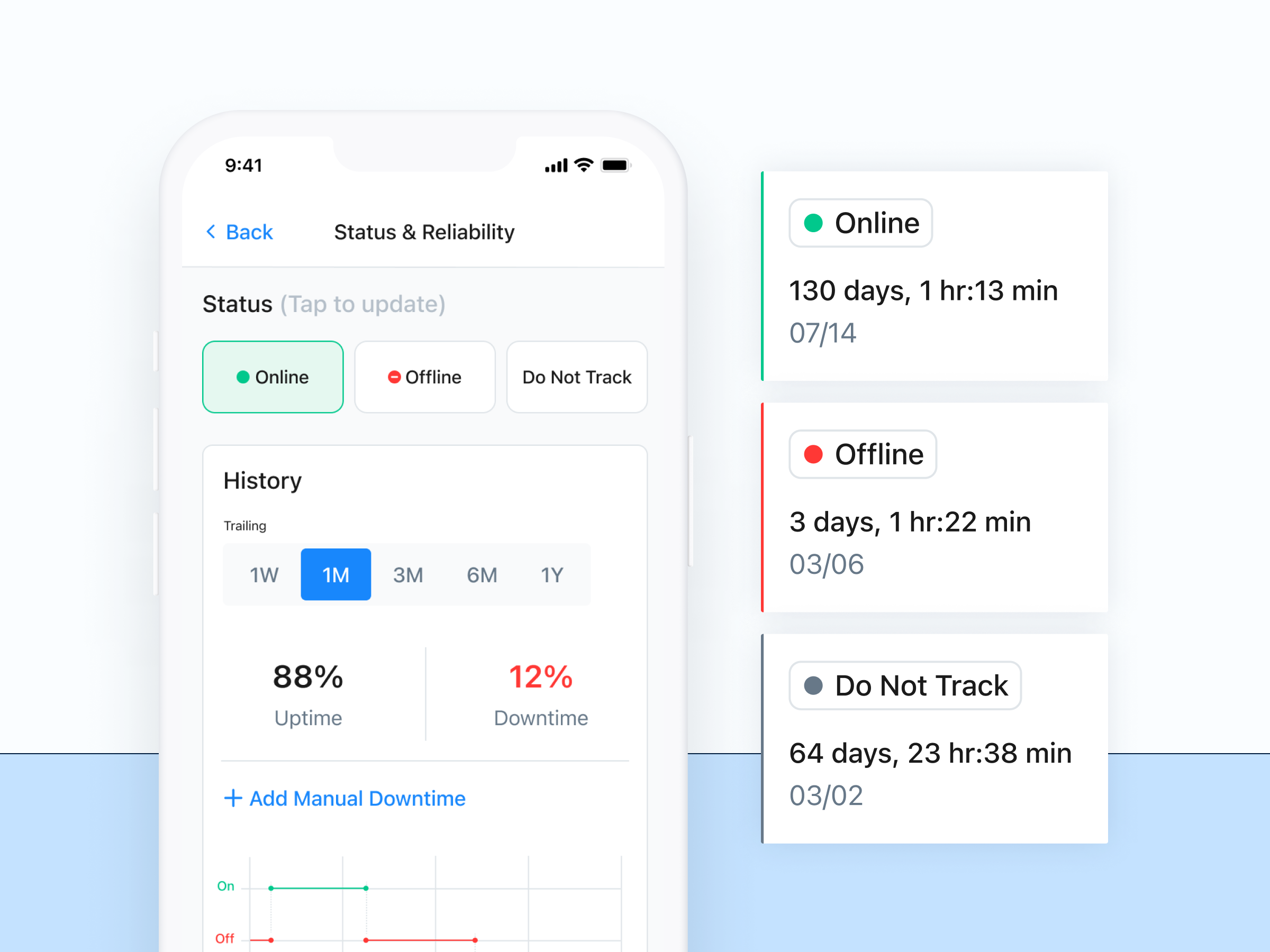
4. Reporting dashboards
Good work order software should make performance easy to see. Dashboards can show completed work, overdue tasks, planned vs. unplanned maintenance, downtime, labor hours, parts usage, and work order costs.
That visibility helps teams spot bottlenecks, balance workloads, and make better resource decisions. It can also show when a recurring issue needs a different maintenance plan, more technician capacity, or even asset replacement.
5. Advanced customization
Work order software should be simple for technicians to use, but flexible enough to match how your operation actually works. The best systems let teams tailor workflows without making the day-to-day experience harder.
That might include custom fields for site-specific data, required fields or signatures for accountability, and automated triggers based on events like meter readings, inspection results, or sensor thresholds. This helps teams capture the right information and standardize work without relying on manual follow-up.
Choosing the best work order software app for mobile
Work order software is now more affordable, functional, and accessible than ever before. There’s no single answer to the question, what is the best work order management app? That’s because it depends on your team, goals, and challenges. One software might work for one team while it’s the wrong choice for another. But there are a few commonalities between the work order apps that have helped maintenance teams be successful, including:
- Native-first mobile access
- Automatic routing of work orders to assigned teams
- Real-time inventory supply management for assets and parts
- Barcode and QR code tagging and scanning
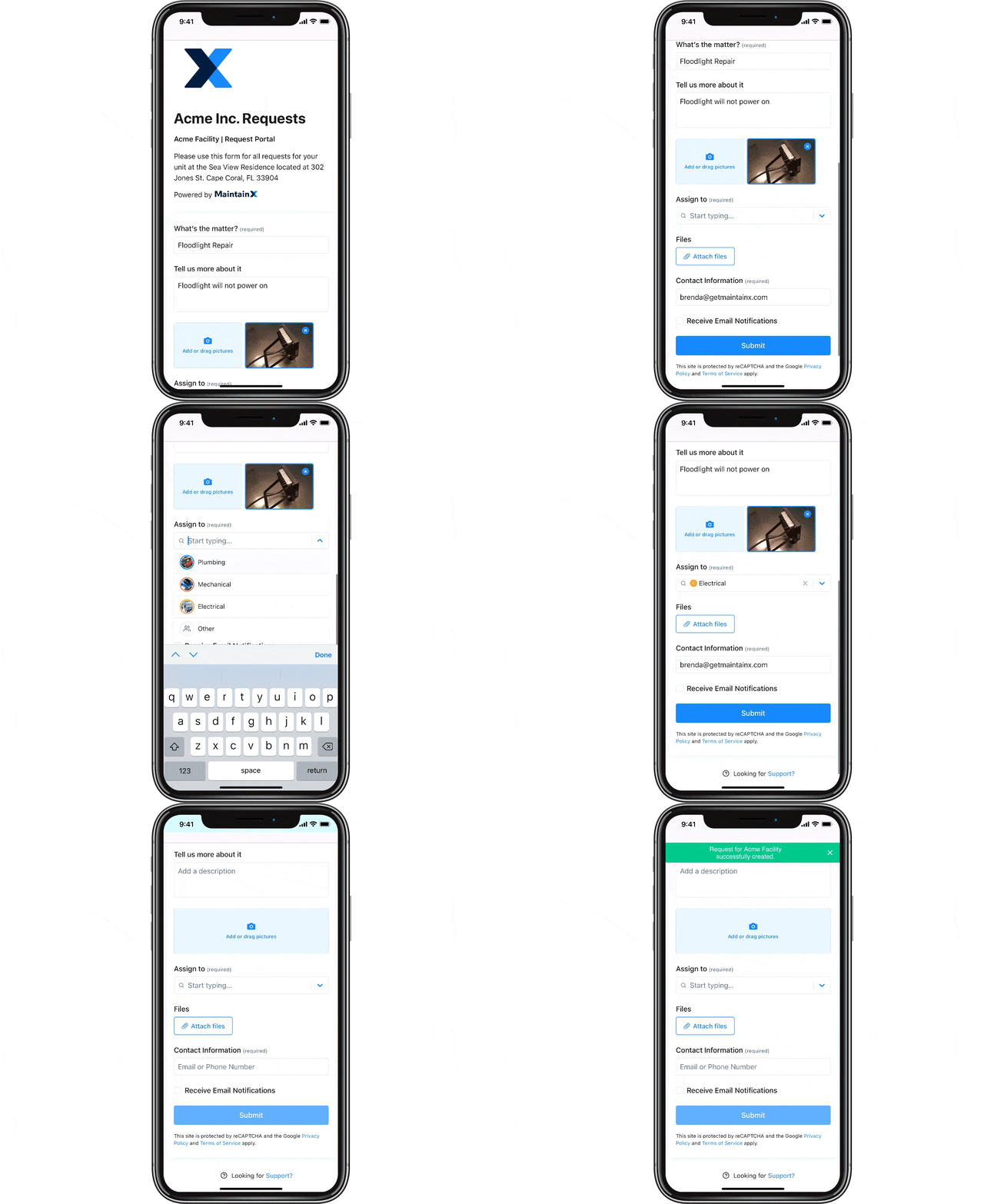
- Fully configurable work order request forms
Request routing is one feature that can make a big difference in day-to-day maintenance. Without a clear routing process, requests can sit untouched, go to the wrong supervisor, or leave requesters wondering whether anyone has seen the issue.
With MaintainX Request Routing, incoming requests can be automatically sent to the right team for review and approval. Supervisors can focus on the requests that are relevant to them, while requesters get updates when their request is approved, declined, or converted into work.
Modern work order software should also make it easy to bring the right people into the conversation. Features like @mentions in work order comments and messages help technicians quickly ask questions, flag issues, or get input from teammates without moving critical context into texts, calls, or side conversations.
Best work order software FAQs
Can work order management software be customized to specific industries or business needs?
Yes. Most modern work order software lets teams customize forms, fields, workflows, approval steps, checklists, and reporting to match how they operate. That matters because a manufacturer, fleet team, and food processing plant may all manage work orders differently. The best systems are flexible enough to support industry-specific needs without making the software hard for technicians to use.
Can work order software integrate with existing systems?
Yes. Many work order platforms integrate with systems like ERPs, MES platforms, asset databases, inventory tools, accounting software, sensors, and business intelligence platforms. These integrations help reduce duplicate data entry and keep maintenance connected to the rest of the operation. For example, parts usage from a work order can flow into inventory or purchasing, while asset and cost data can support finance and reporting teams.
Is training required to use work order software effectively?
Usually, yes, but the amount depends on the software and the complexity of your workflows. Technicians should be able to learn basic tasks like viewing, updating, and closing work orders quickly. Admins and managers may need more training to configure workflows, build reports, manage assets, and set up preventive maintenance. A good platform should make daily use simple while still offering support for more advanced setup.
How does work order software improve maintenance operations?
Work order software gives maintenance teams a clearer way to manage work from request to completion. It helps teams prioritize tasks, assign the right technician, track status updates, document repairs, and capture asset history in one place. Over time, that improves response times, reduces missed work, supports preventive maintenance, and gives managers better visibility into labor, downtime, parts usage, and recurring equipment issues.
What features should you look for in work order software?
Look for software that makes daily work easier for technicians and gives managers better control. Key features include mobile access, work request forms, task assignments, preventive maintenance scheduling, asset history, parts inventory, photos, comments, QR or barcode scanning, reporting dashboards, and integrations with other systems. The best option should be easy to use in the field while still flexible enough to support your maintenance processes.
Is work order software the same as CMMS?
Not always. Basic work order software usually focuses on creating, assigning, and tracking tasks. A CMMS typically goes further by connecting work orders to assets, preventive maintenance, parts inventory, inspections, labor, reporting, and compliance records. Some modern platforms blur the line by offering both simple work order management and more advanced CMMS functionality in one system.
Why is mobile access important in work order software?
Maintenance work usually happens on the floor, in the field, or across multiple sites—not at a desk. Mobile access lets technicians view assignments, update work orders, add photos, scan QR codes, check asset history, and communicate in real time from wherever the work is happening. That improves adoption, speeds up updates, and helps teams capture more accurate maintenance data.

Marc Cousineau is the Senior Content Marketing Manager at MaintainX. Marc has over a decade of experience telling stories for technology brands, including more than five years writing about the maintenance and asset management industry.




.webp)